How BookWit works
Every feature, what it does, and where it runs. Most of the personal parts never leave your iPhone.
Your shelf
Your shelf is the heart of BookWit: every book you're reading, want to read, or have finished, sitting on ledges you design.
Adding books
- Barcode. Point the camera at the back cover. The ISBN is matched to the book on Open Library.
- Cover. Take a photo of the front. Our AI reads the cover and finds the edition.
- A whole bookcase. Photograph your shelf and BookWit picks out every spine it can read, so you can add them in one go.
- Import. Bring a list over from Goodreads, StoryGraph or Book Journal. Books are added quietly, without posting to your friends.
Making it yours
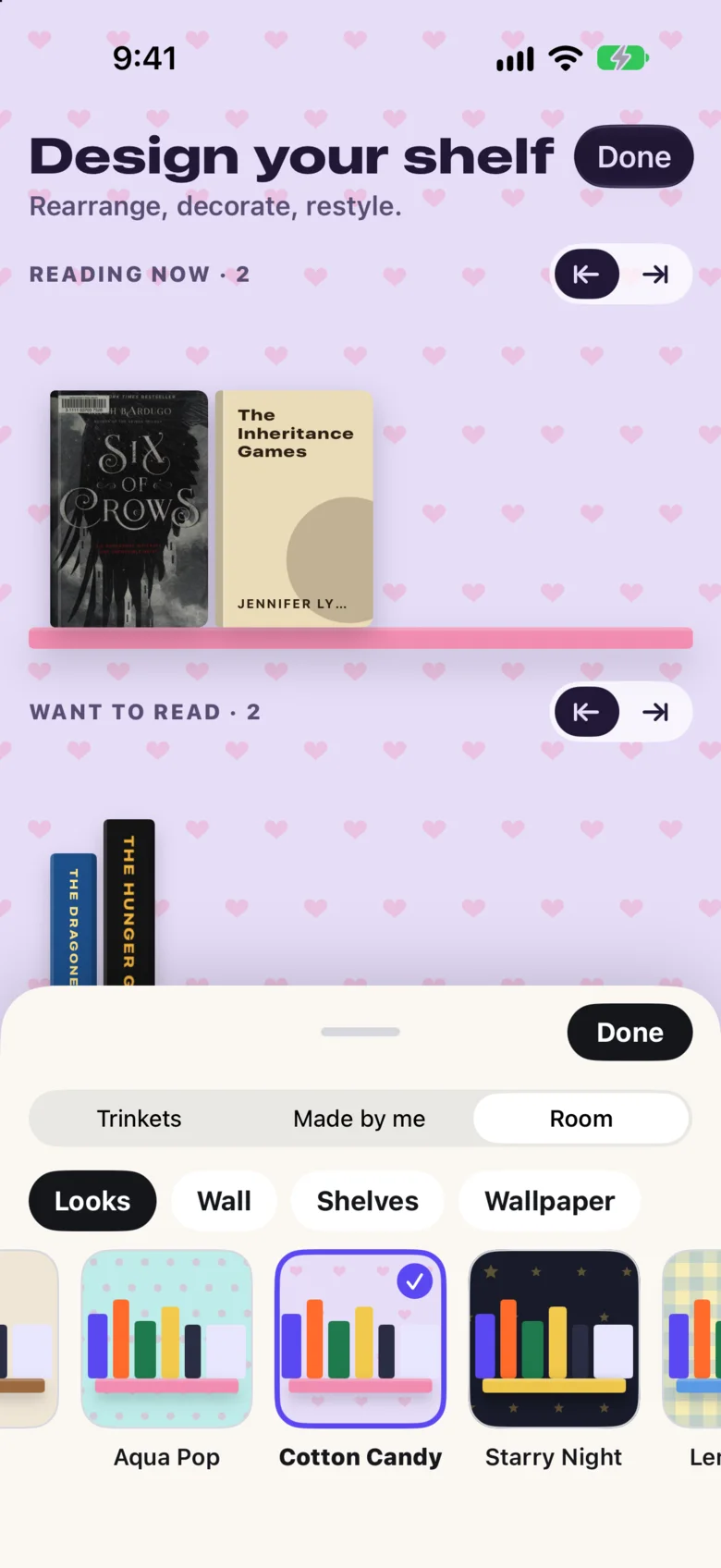
- Choose from fifteen looks, such as Starry Night, Cotton Candy and Garden, or mix your own wall color, ledge and wallpaper (dots, gingham, stars, daisies and more).
- Show books as covers on a shelf, as spines in a row, or stacked.
- Hold anything to start designing: drag books between shelves and rearrange them.
- Take a photo of something you love, like a plant, a mug or a pet. BookWit lifts it out of the photo and draws it as a trinket for your shelf.
Reading sessions
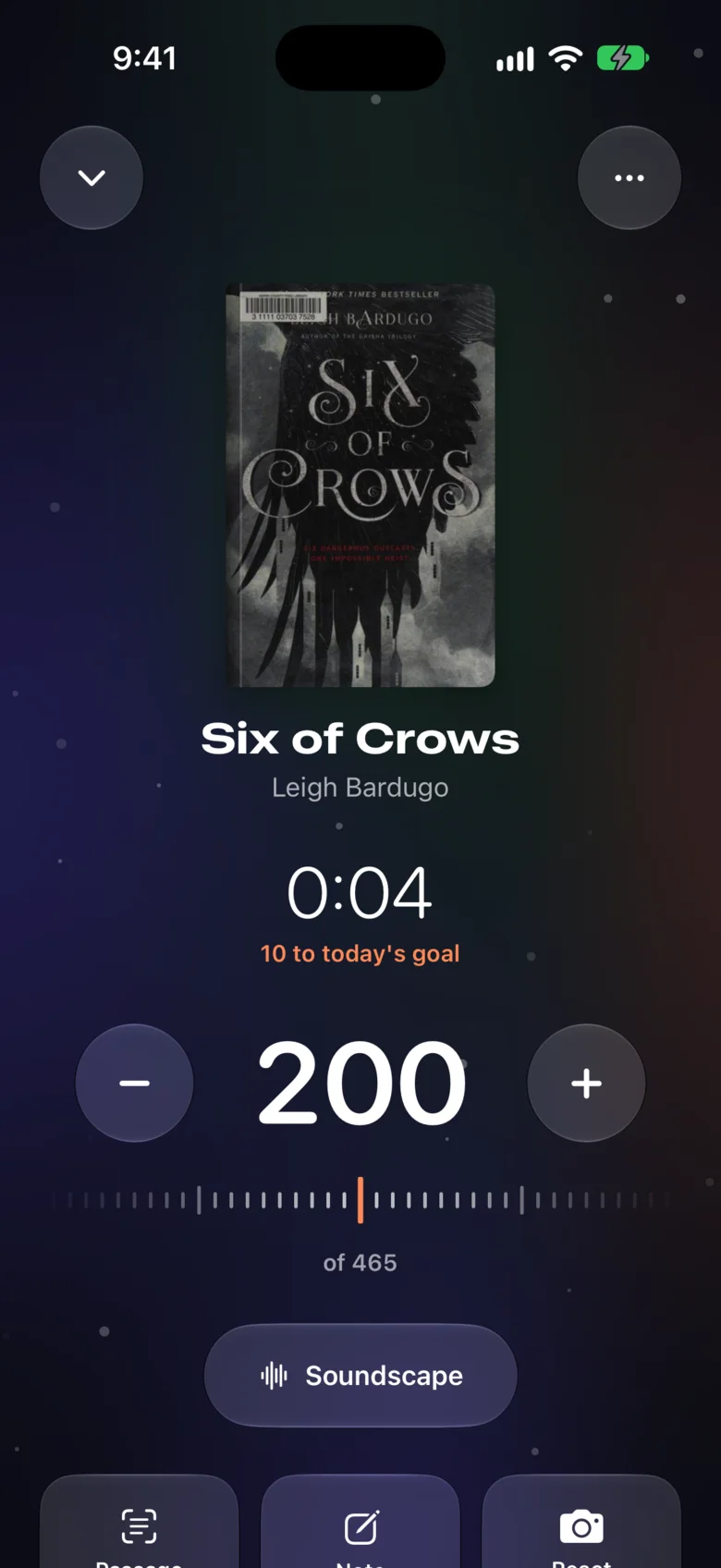
Tap Start reading on a book to begin a session. A timer runs, and a page dial lets you move to the page you stop on. When you finish, BookWit logs the pages and time toward your goal.
- Chapters. BookWit maps pages to chapters from the edition's table of contents on Open Library, or estimates them when there isn't one. Chapter names appear only when they come from a real table of contents. You can correct the map for your copy.
- On your Lock Screen. A Live Activity shows the session while your phone is locked. You can add pages or finish right from it, start reading from Control Center, or ask Siri to log pages.
- Reactions. Capture a photo or a clip of up to 30 seconds with the front camera when a chapter gets you, with stickers and confetti if you like. It's saved with your notes.
Soundscapes
During a session, tap Soundscape to play calm instrumental music written for the chapter you're on.
- Our AI writes a short, spoiler-free brief for the chapter's mood, using only public details: the title, author, genre and chapter number.
- The brief goes to ElevenLabs, which composes an instrumental track.
- The track is saved for that book and chapter. Everyone reading the same chapter hears the same music, so it's only made once.
Each reader can start a limited number of new soundscapes a day, because composing music costs real money. Tracks that already exist don't count.
Saved passages
Take a photo of a page, then drag across the lines you want. Text recognition runs on your iPhone, so the photo isn't uploaded to read it. BookWit can tell the two pages of a spread apart.
Pick a highlight color, and the passage is saved as a quote with the book and page number. Quotes are private unless you mark one “share with my crew”.
Recaps, quizzes and review drafts
Coming back to a book after a week? Ask for a recap. Apple Intelligence on your iPhone writes it from your own notes and quotes, and it stops at the page you're on. It can also make a quick quiz, or draft a review when you finish.
Discover
Discover starts with hand-picked lists. Below them, describe what you're in the mood for, like “Percy Jackson, but with dragons” or “can't put down”, and our AI suggests books based on the titles, ratings and tags on your shelf. Each pick says why it was chosen, and you can add it to your list or skip it.
Friends and book clubs
- Friends by code. There's no search and no public profile. Two readers trade codes to become friends.
- Book clubs. Read a book together. Chat unlocks as each member reaches each part, so no one sees spoilers.
- Your crew's reading. See what friends have started and finished, and add their books to your list.
- Under 13. Friends and clubs stay locked until a parent links their account, and the parent approves every friend. More for parents.
Goals and streaks
Set a daily page goal (ten is a good start) and BookWit keeps your streak, shows your week at a glance, and celebrates when you finish a book. Home Screen widgets show today's progress.
If your school runs 10 a Day, join your homeroom by scanning its poster. Your pages count toward your homeroom's total, and nobody else sees your own count. How it works for schools.
What runs where
| Feature | Where it runs | What leaves your phone |
|---|---|---|
| Barcode scan | iPhone, then Open Library | The ISBN |
| Cover and shelf scan | Our servers, then Anthropic (AI) | The photo of the cover or shelf |
| Saved passages | iPhone | The saved quote text, to sync your account |
| Recaps, quizzes, reviews | iPhone (Apple Intelligence) | Nothing |
| Recommendations | Our servers, then Anthropic | Titles, ratings and tags on your shelf |
| Soundscapes | Our servers, then Anthropic and ElevenLabs | Public book details and the chapter number |
| Trinkets | iPhone lifts the object; our AI draws it | The lifted object |
| Imports | iPhone reads the file; our servers match the books | Titles and authors to match, plus column names and a few sample rows for formats we don't recognize |
Full details are on the privacy page.
Questions
Which iPhones does BookWit work on?
Any iPhone with iOS 26 or later. Recaps, quizzes and review drafts also need an iPhone that supports Apple Intelligence.
Is there an Android or iPad version?
Not yet. BookWit is iPhone-first. Join the waitlist on the Get BookWit page and we'll email you when there's news.
Do I need to be in a school to use it?
No. BookWit works on its own for anyone who reads. School challenges are an extra you join with a code.
Does BookWit show ads?
No. There are no ads, and we never sell or share reading data.
Can I take my data with me?
Your shelf, notes and quotes live in your account. You can delete your account and everything in it from Profile in the app.
- Platform
- iPhone, iOS 26+
- Status
- Free beta
- Ads
- None